
Ask small business owners whether they use AI and most will say yes. Ask whether it has changed how the business runs and the answer gets quieter. The gap between those two answers is where the money is.
Most have tried it. Few have built it in
In a Goldman Sachs 10,000 Small Businesses Voices survey of 1,256 owners in early 2026, 76% said they use AI, and 93% of them said it had a positive impact. Only 14% said it is fully embedded in their core operations. Owners named the obstacles as a lack of technical expertise, difficulty choosing tools and data privacy concerns, and 73% said more training and implementation support would help.
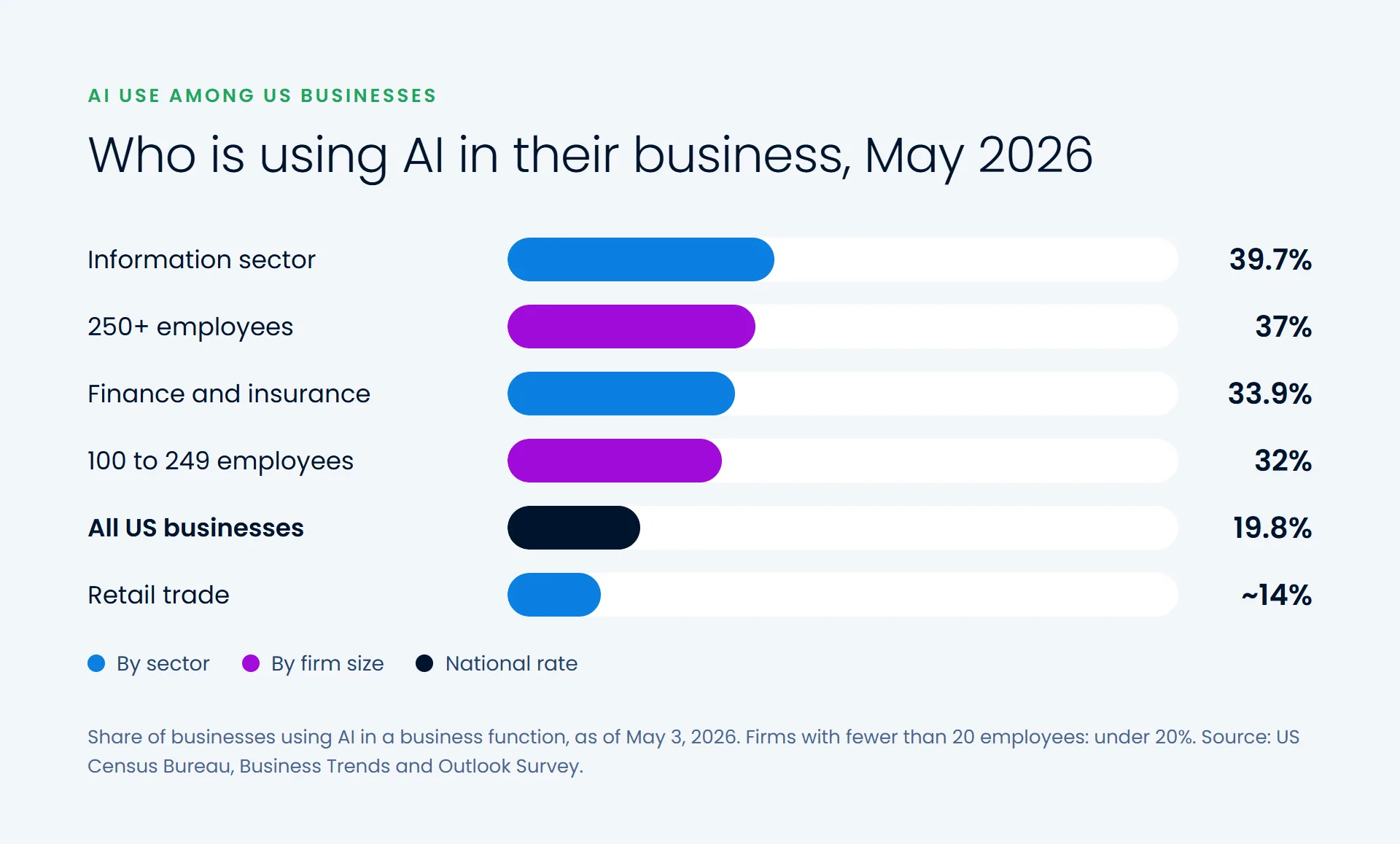
The Census Bureau measures something stricter, AI used in a business function, and finds less of it. As of May 2026, 19.8% of US businesses reported using AI that way. Among firms with 250 or more employees it was 37%. Among firms with fewer than 20, it was under 20% and hadn't changed significantly in months. Use is highest in information (39.7%) and finance and insurance (33.9%), and lower in sectors such as retail, at about 14%.
Where AI pays off now
The strongest evidence comes from controlled studies. When 5,179 customer support agents were given an AI assistant, they resolved 14% more issues per hour on average, and newer, less experienced staff improved by 34% (NBER). Customer sentiment and staff retention improved too. In a BCG experiment with 758 consultants, those using GPT-4 to develop new product ideas performed 40% better than those without it.
In a small business, the same pattern shows up in everyday work:
- Drafting emails, quotes, proposals and product descriptions for a person to edit
- Answering routine customer questions from your own policies, prices and FAQs
- Summarizing calls, meetings and long documents
- Helping new staff find answers and learn the job faster
- Turning rough notes into first drafts of job ads, policies and checklists
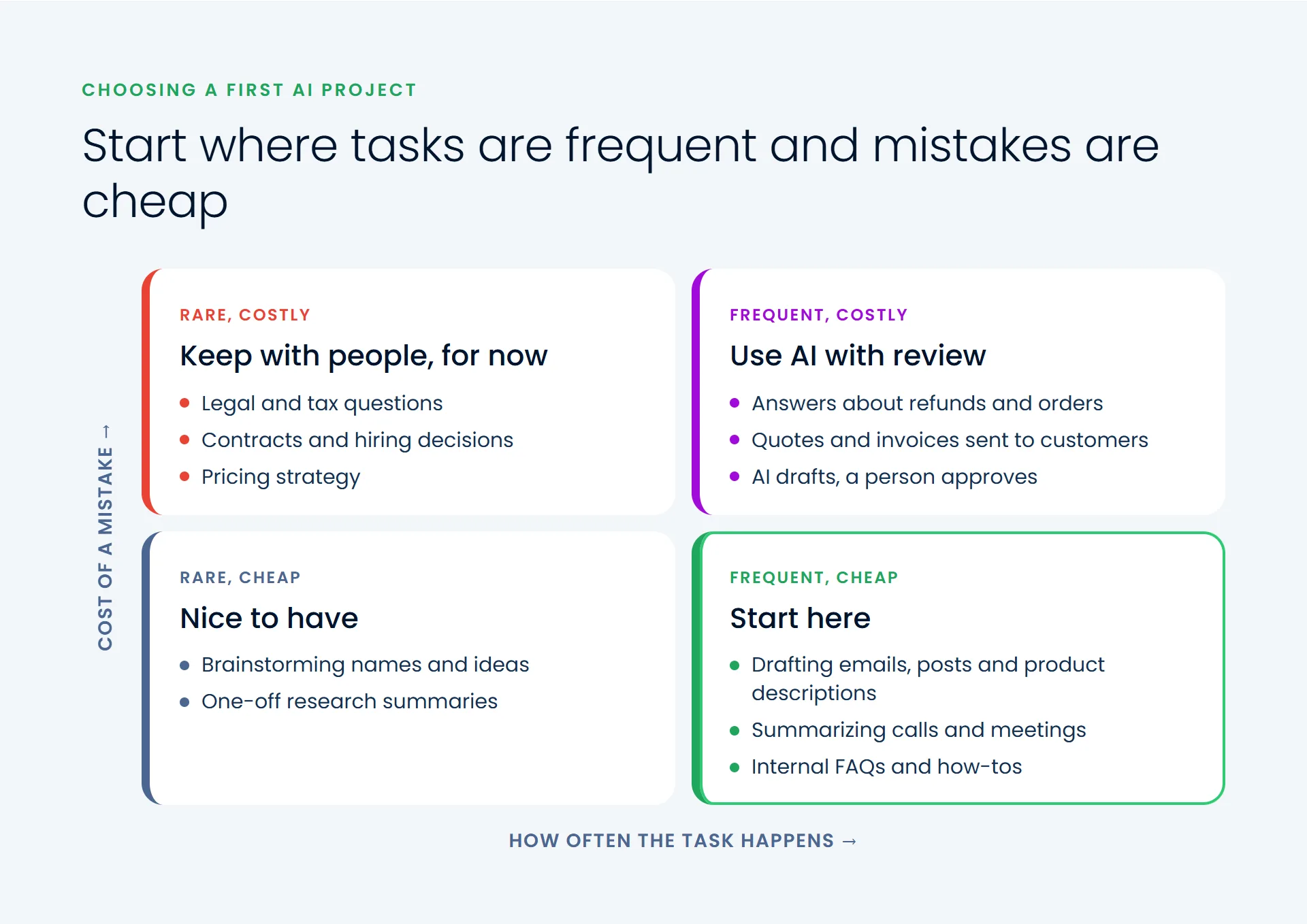
What these have in common: the work happens often, a person reviews the result, and a mistake is cheap to fix.
Where it doesn't yet
The same BCG study found the opposite on a business problem outside the tool's competence. Consultants who took GPT-4's misleading output at face value performed 23% worse than those who didn't use it at all. A confident answer isn't a correct one. Facts the AI hasn't been given, such as stock levels, delivery dates or tax treatment, are where invented answers do the most damage.
Customer-facing answers also carry liability. In 2024 a Canadian tribunal ordered Air Canada to compensate a passenger after its website chatbot described a bereavement refund the airline didn't offer. The airline argued the chatbot was responsible for its own words, and lost, paying about C$650 in damages. Anything legal, financial or contractual, and anything a customer will act on, needs a person checking it.
How to choose your first AI project
Look for work that's frequent, text-heavy and easy to check, where a mistake is cheap and caught before it reaches a customer. Start from your own information, such as policies, prices and past answers, so the AI draws on what's true for your business rather than what's typical. Measure one thing before and after, such as time per quote, response time or tickets closed per day. Give one person responsibility for it, and review the results every week for the first month.
Then decide what it would take to make it part of how the business runs, not a side experiment. Only 14% of owners in the Goldman Sachs survey have taken that step, and it's where the real return is. Our data and AI team helps businesses choose that first project and build it into their daily work.