
The renewal notice arrives. The tool costs more than last year, three people use it, and the feature everyone asked for is still "on the roadmap." Couldn't we just build this ourselves?
For some companies, yes. For others, it's a fast route to a worse version of software they already paid for. A few questions asked before anyone writes code make the difference.
The subscription pile is real
Zylo's 2026 SaaS Management Index found that the average company manages 305 SaaS applications. In 2025, organizations used only 54% of the licenses they paid for, and 48% of SaaS spending was driven by business units outside IT, which is how one job ends up done by three tools in three departments. Smaller companies know the pattern.
Building got cheaper, but read the headlines closely
AI coding tools have lowered the cost of building simple internal software. In Retool's 2026 survey of 817 of its customers and builders, 35% said they had already replaced at least one SaaS tool with a custom build, and 78% expected to build more of their own tools this year. Respondents use a building platform, so they lean toward building, but the order of replacement is telling.
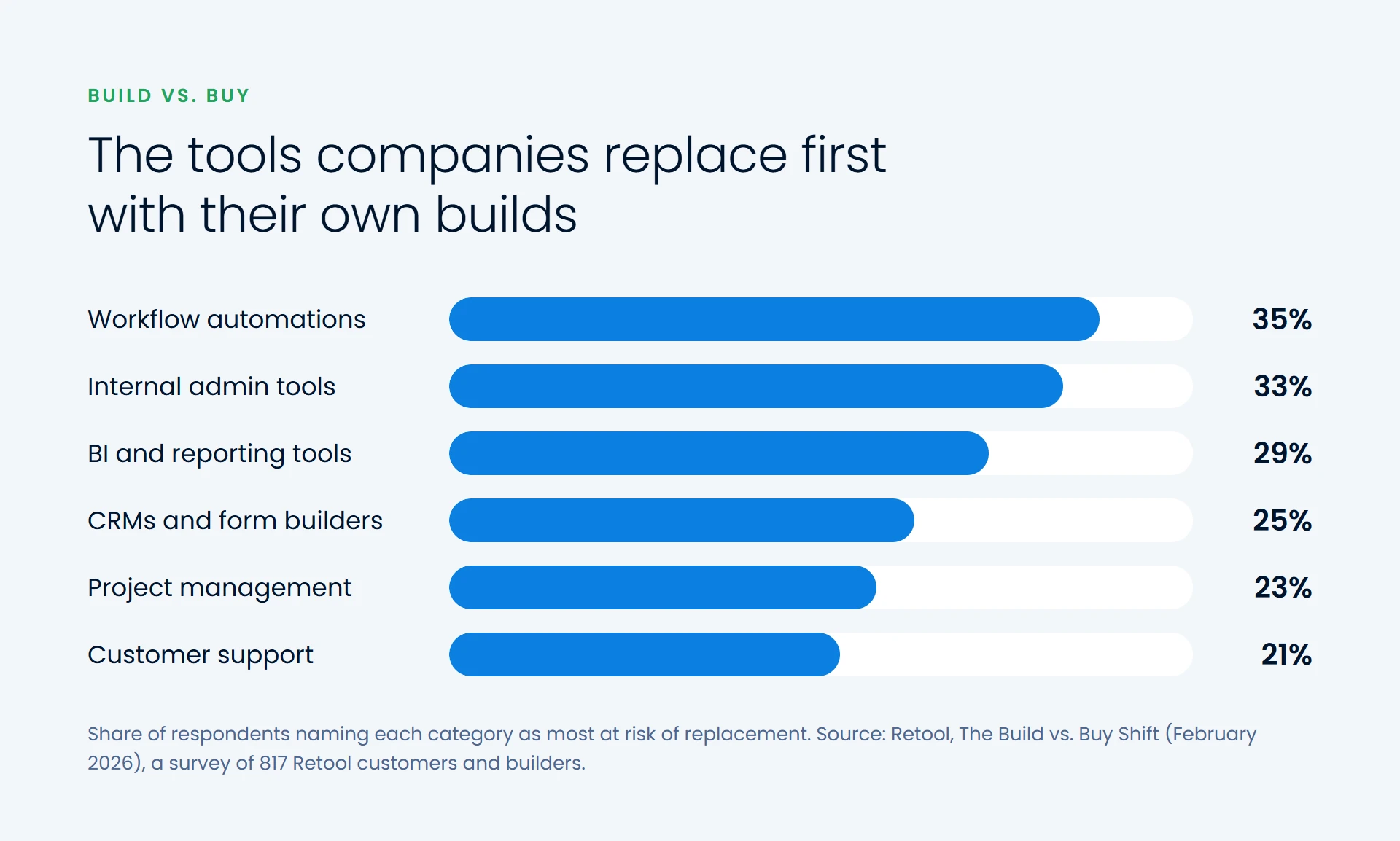
The top categories sit on your own processes and data: general-purpose products bent into shape, paid for in full and still needing workarounds.
The bigger stories need a closer read. In 2024, Klarna's chief executive said it had shut down Salesforce, which spread as proof AI could replace enterprise software. In March 2025, Sebastian Siemiatkowski set the record straight: Klarna had brought data from many SaaS systems into a stack it built itself. "So no, we did not replace SaaS with an LLM," he wrote, and doubted many companies would follow. It was an engineering project by a large technical team, not a chatbot replacing a CRM.
Four questions to ask before you replace anything
1. A commodity process, or how you compete?
Payroll, accounting, email and tax filing work the same for everyone, and vendors spend years on their regulations and edge cases. Keep buying them. Software that captures how you quote, schedule or serve customers is different: if it helps you beat competitors, owning it can be an advantage.
2. How much do you actually use?
Pull the usage data before the renewal. A team using two screens of a tool that does fifty things is a strong signal. If people use it daily and deeply, a replacement must rebuild everything they rely on.
3. What will it cost to own, not just to build?
Hosting, updates, fixes and someone on call last as long as you use it. For illustration: a tool at $30 per user per month for 25 people costs $9,000 a year, or $27,000 over three years, so a replacement has to be built and run for three years for less. For a narrow internal tool, that's often realistic. For a product with years of features behind it, rarely.
4. Who owns it when it breaks?
The same Retool survey found that 60% of builders had built something outside IT oversight in the past year. That's how useful tools appear fast, and how a business ends up relying on an app one person built and nobody has checked for security. Decide up front who maintains it, where the code lives and how it's secured.
What to build, what to buy, and the middle path
Building usually pays off for internal workflows, back-office tools on your own data, reporting on the numbers you watch, and jobs that use a fraction of a large product. Accounting, payroll, tax, email, identity and security are better bought, as are platforms your teams use deeply. Often the best move sits in between:
- Consolidate. Three tools doing one job can become one.
- Right-size. Drop unused seats and move to the plan you need.
- Build a thin layer. Keep the platform for what it does well, and build a small tool on its API for what's unique to you.

How to start
List every subscription, its cost, who uses it and how often, and mark each keep, consolidate, right-size or replace. Then pilot one candidate, ideally an internal tool with a clear owner and a few users. Measure its cost to build and run, and how the work changes. It will tell you more about your next five decisions than any survey.
Software you own is software you maintain. For an outside view on which tools to keep, consolidate or replace, our custom software and digital transformation teams can help.